


OBD to Type C Charger from TecUpdater, with Same/Next day Free BlueDart shipping and a 6-month warranty.
OBD to Type C Cable Type-C Dash Power — OBD-to-Type-C output cable with battery protection for dash cams and car DVRs, 24-hour parking mode support. It offers reliable fitment, with Same/Next day Free BlueDart shipping.
OBD to Type C Charger: OBD To Type-c Dash Cam Power Cable — Overview
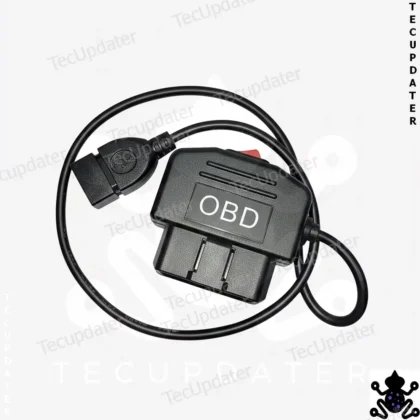
Running a 3-metre lead from the OBD2 port to a 5V/3A USB-C output, this OBD to Type-C dash cam power cable needs no wire cutting to install. A physical switch on the OBD to Type-C dash cam power cable selects 24-hour or ACC power, cutting off at 11.6V to protect the battery.
Power Your Dashcam from the OBD Port — USB-C Output with 24H and ACC Mode Switch
| Brand | TecUpdater |
| Input Connector | OBD2 male plug |
| Output Connector | USB Type-C Male |
| Output Rating | 5V 3A |
| Cable Length | 3 metres |
| Power Modes | 24H Always-On / ACC Ignition-Based (physical switch) – 11.6v Power Off – Battery Saving |
| Application | Dashcam, car DVR, USB-C accessories |
| Wire Cutting Required | No |
| Coding Required | No |
| Kit Contents | 1x OBD2 to USB-C power cable with mode switch |
| Return Policy | Exchange Only |
| HSN Code | 8544 |
What It Is
This is a 3-metre OBD2 to USB Type-C power cable designed to supply 5V at 3A directly from a vehicle’s OBD2 diagnostic port. It is intended for dashcams, car DVRs, and other USB-C powered accessories that need a stable, dedicated power source inside the cabin. The cable includes a physical two-position switch to select between continuous 24-hour power and ignition-controlled ACC power, depending on how you want the connected device to behave.
The 3-metre length is deliberate. Most dashcam installations require the cable to be routed neatly along the A-pillar, across the headliner, or behind trim panels — a short cable rarely reaches cleanly from the OBD port near the driver’s footwell to a dashcam mounted at the top of the windscreen. This length handles that routing with enough slack to tuck away properly without forcing awkward cable management.
What Problem It Solves
Powering a dashcam cleanly is harder than it looks. Plugging into a 12V socket or car charger works but leaves a visible cable dangling across the cabin. Hardwiring into the fuse box is the cleanest option but requires panel removal, fuse tap selection, and wiring work that many users want to avoid. For anyone looking for something in between — a permanent-looking installation without touching the fuse box or cutting any wire — the OBD port is a practical alternative.
The OBD2 port provides continuous 12V on pin 16 and a switched ACC signal, which this cable converts to a stable 5V 3A USB-C output. The mode switch lets you decide upfront whether the dashcam should record only when the car is running or stay active for parking surveillance as well. That decision used to require different wiring approaches or separate hardwire kits. Here it is handled by a single physical switch that you set once during installation.
Installation Logic
Plug the OBD2 male connector into the vehicle’s diagnostic port, which is typically located under the dashboard on the driver’s side. Connect your dashcam or DVR to the USB-C output port. Set the mode switch to your preferred power behaviour before routing the cable. From there, route the 3-metre cable along the A-pillar trim and across the headliner to reach the dashcam position. The cable can be tucked behind factory trim clips without permanent attachment.
No fuse tapping, no wire cutting, and no coding is required at any stage. The OBD port itself is not modified and the vehicle’s diagnostic functions remain fully accessible if you need to connect a scan tool later, though you would need to unplug this cable temporarily to do so.
Behaviour Explanation
In ACC mode, the USB-C output receives power only while the ignition or ACC circuit is active. When you switch off and exit the vehicle, power to the dashcam cuts automatically. This is the standard behaviour most dashcam users want for daily driving — the camera records while driving and stops when the car is off, without any drain on the battery.
In 24H mode, the cable draws from the OBD port’s permanent 12V supply, which remains live regardless of ignition state. The dashcam or DVR will continue running as long as it is connected and the vehicle battery has sufficient charge. This mode is suited for parking surveillance setups where the camera needs to remain active after the car is locked. Since the OBD port’s permanent supply comes directly off the battery, extended use in this mode will draw down battery charge over time — exactly as it would with any hardwired parking mode setup. There is no automatic voltage cutoff in this cable; managing parking mode duration is left to the dashcam’s own parking mode settings or timer if it has one.
Key Compatibility
This cable is compatible with any vehicle fitted with a standard 16-pin OBD2 port. That covers virtually all petrol and diesel cars sold in India after 2010, including Maruti, Hyundai, Kia, Tata, Mahindra, Honda, Toyota, Volkswagen, Skoda, and most other mainstream manufacturers. Compatibility depends entirely on OBD2 port presence, not on vehicle platform, model year within that range, or wiring configuration.
The output is USB Type-C, which is now the standard charging and data port on most current-generation dashcams and DVRs. If your dashcam uses a micro-USB or USB-A input, this cable will not be a direct fit — the existing OBD2 to USB-A version from TecUpdater covers that case instead.
Who Should Buy
This cable is well suited for anyone installing a dashcam or car DVR who wants a clean, wire-free power solution without opening the fuse box. It is particularly useful for those installing Type-C dashcams in cars where routing a cable from the cigarette lighter socket would require crossing the entire dashboard. The 3-metre length makes it appropriate for most sedan, hatchback, and SUV cabin layouts. Users who want parking mode surveillance capability will benefit from the 24H mode option, provided they understand that duration management relies on the dashcam itself.
Who Should Not Buy
If your dashcam or DVR uses a micro-USB or USB-A connector, this cable does not apply — check the USB-A variant instead. If you need automatic low-voltage battery protection built into the cable itself, this product does not include that feature; the TecUpdater OBD2 Dash Cam Hardwire Kit with low-voltage cutoff is a better fit for that requirement. If your vehicle’s OBD2 port is already permanently occupied by a tracker or diagnostic device and cannot be freed up, this cable cannot be used without an OBD2 splitter. Users in vehicles manufactured before 2000, or certain older commercial vehicles without standard OBD2 ports, should verify port availability before purchasing.
Benefits
Installs in minutes without tools or electrical knowledge. The 3-metre cable provides enough reach to route cleanly behind A-pillar and headliner trim in most vehicles. At 5V 3A, output is sufficient for current-generation dashcams including those with GPS modules or dual-channel recording. The physical mode switch is set once and stays put — no app, no app pairing, no configuration required. The cable can be removed and transferred to a different vehicle whenever needed.
FAQs
This cable carries a 6 month warranty, with an exchange-only return policy.
It works with any dashcam or car DVR that accepts a USB Type-C 5V/3A power input. If your dashcam uses a micro-USB or USB-A connector instead, this cable won’t fit directly — the OBD2 to USB-A version from TecUpdater is the correct choice for that.
Potentially, yes. In 24H mode the cable draws from the OBD port’s permanent 12V supply, which comes directly off the battery and stays live regardless of ignition state. There is no automatic voltage cutoff built into this cable, so extended use in 24H mode will draw down battery charge over time, the same as any hardwired parking mode setup — managing how long it runs is left to your dashcam’s own parking mode settings or timer.
Yes. The OBD port itself is not modified, so the vehicle’s diagnostic functions remain fully accessible — you’d just need to unplug this cable temporarily to connect a scan tool.
Yes, the 5V 3A output is sufficient for current-generation dashcams, including those with GPS modules or dual-channel recording.
No. The cable plugs into the OBD2 port and the dashcam’s USB-C input with no wire cutting or fuse tapping required.
No coding is required at any stage of installation.
No. It’s plug and play — connect the OBD2 end to the diagnostic port and the USB-C end to your dashcam, then route the cable along the A-pillar and headliner and tuck it behind trim clips.
In ACC mode the USB-C output only receives power while the ignition or ACC circuit is active, cutting off automatically when you switch off and exit the vehicle. In 24H mode the cable draws from the OBD port’s permanent 12V supply, which stays live regardless of ignition state, so the connected device keeps running continuously — useful for parking surveillance, though it will drain the battery over extended periods since there’s no built-in cutoff.
The length is deliberate so the cable can route cleanly from the OBD port near the driver’s footwell, along the A-pillar trim and across the headliner, to reach a dashcam mounted at the top of the windscreen, with enough slack to tuck away neatly.
One OBD2 to USB Type-C power cable with a built-in mode switch.
Compatibility depends on the vehicle having a standard 16-pin OBD2 port, which covers virtually all petrol and diesel cars sold in India after 2010 across brands like Maruti, Hyundai, Kia, Tata, Mahindra, Honda, Toyota, Volkswagen, and Skoda. Vehicles manufactured before 2000, and certain older commercial vehicles without a standard OBD2 port, should have port availability verified before ordering.
Browse more options in our Accessories category.
Want the background? Read more about on-board diagnostics (OBD).





Rahul Sen –
I have powered my new dash cam with this product.